
This page as an PDF-Document? Click on that Symbol and wait a little moment... ---> |
 |
|

MikroKopter-Tool Settings |
Inhaltsverzeichnis
Preface
You can set all settings of your MikroKopter with our free MikroKopter-Tool (Download).
For the standard setting you only have to set the channels you will use. With this setting the copter is normally ready for take off.
All other values are already set and there is no need to change them.
The Flight controller includes five (5) storage spaces (Parameterset => Settings). Each storage space can be set individually.
So you can e.g. set one storage space for a servo gimbal and a other storage space for a brushless gimbal.
The needed setting can also be load via the transmitter (see ''Load setting via transmitter'').
Settings


Click on the button Settings in the MikroKopter-Tool to
access the settings.
A description of the individual settings can be found here =>
Overview
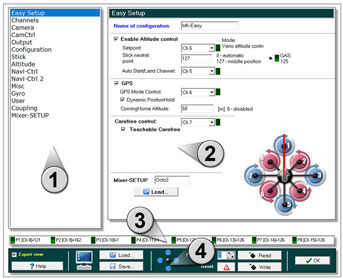
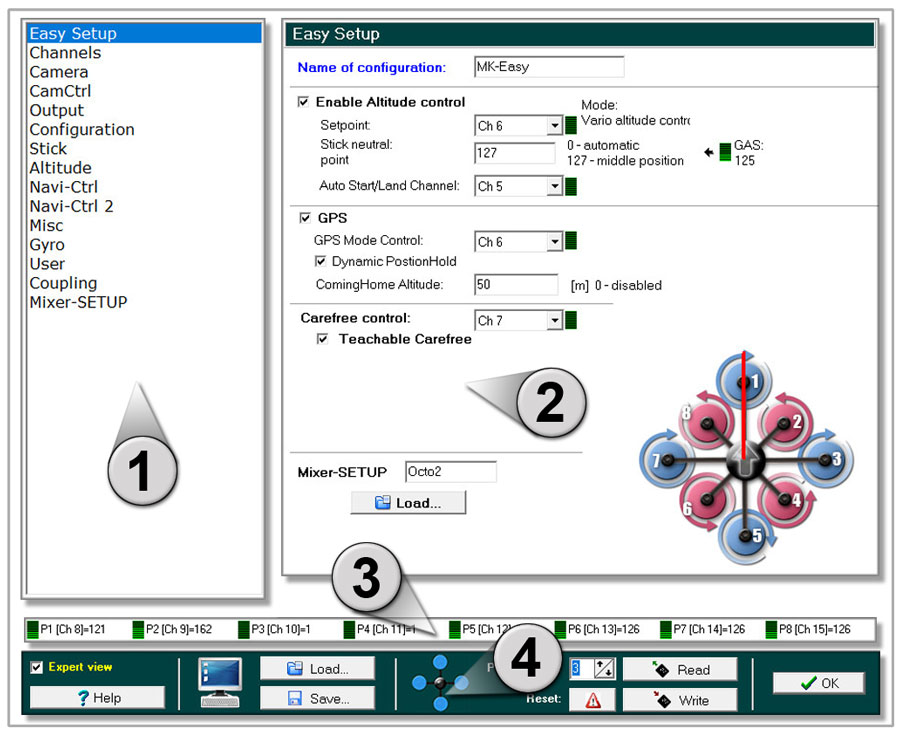
The setting window is divided into 4 areas:
1 - Menu selection
2 - Adjustment window
3 - Channel view
4 - Save and load
1
Menu selection
In the standard view you see the important settings you need for the firs setting.
If you activate Expert view (in the lower bar) you see more settings you can chose.
INFO:
The Expert view is normally not needed.
If you change the standard settings you can improve the flight characteristics, or deteriorate.
2
Adjustment window
Depending on the selected setting you can see a corresponding adjustment window.
Different settings are possible depending on the selected menu.
3
Channel view
On the remote control, the available channels are assigned to a switch, push button or poti.
These channels can be assigned to the individual functions of the MikroKopters.In the settings on your copter you can set single channels to a "POTI" 1-8. This channels you can see here.
When you use switch, push button or poti on the remote control you can see here a changing bar and value.

4
Save and load
In the lower bar you can do different things.

Button Help
- Opens a Wiki-Internet page with a description of the setting you see
Button Load
- Load a setting stored on the pc
Button Save
- Saves the current settings to the PC
Selection field Parameterset
Select the Parameterset to be set
INFO: For each single Parameterset you can set an individually name.
Button Reset
- Load the standard settings for the load Parameterset
Button Read
- Reads the settings from the copter.
Button Write
- writes the settings into the copter
Button OK
Close the settings window.
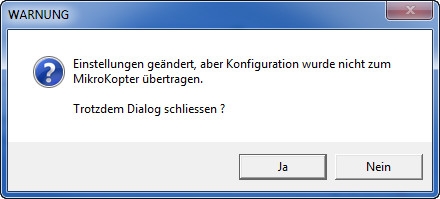
INFO:
If you change something and do not write it into your copter,
you will see this window:
Load setting via transmitter
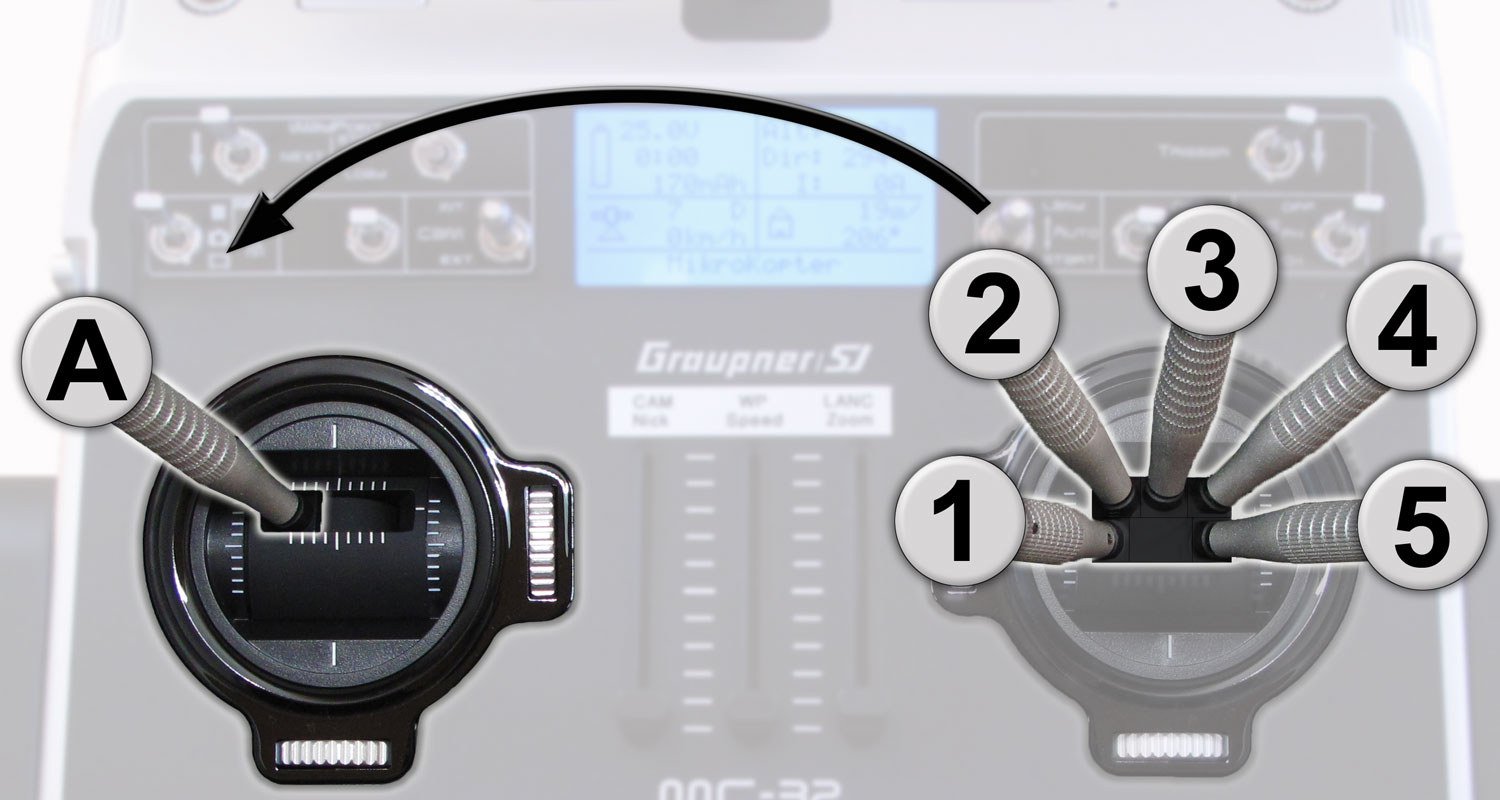
- Here the single stick positions:
With your transmitter you can load the single Parametersets (Settings) of your MikroKopter.
Choose the setting you will load (1-5) and hold the stick position ...
... and "activate" (A) the setting.
The copter will then "beep" 1-5 times (depending on the load setting) and in the telemetrie display of your transmitter you will see short the aktive setting.
(Example Mode 2)Setting 1 => Roll left + Nick center plus throttle up + yaw left
Setting 2 => Roll left + Nick up plus throttle up + yaw left
Setting 3 => Roll center + Nick up plus throttle up + yaw left
Setting 4 => Roll right + Nick up plus throttle up + yaw left
Setting 5 => Roll right + Nick center plus throttle up + yaw left
Info
A changing ofvthe settings can help in fine-tuning of the copter.
But this will not help when the copter have flight problems!
With the default settings you can fly every MikroKopter easily!
If the copter do not fly properly with the default settings, a faulty assembly of the copter or a wrong route of the lines can be the cause. In this case please check the assembling of the copter first.
All settings are preset. If changes are made to the settings, be sure that a valid data is entered.
If a setting with incorrect values ??are loaded, the copter can crash!
Never change a setting during flight (e.g. with a Wi.232)! Then the copter will crash!
So you have to land first and stop the motors. Then you can change the settings.